
Retool Alternatives in 2026: The Best Platforms for Building Internal Tools
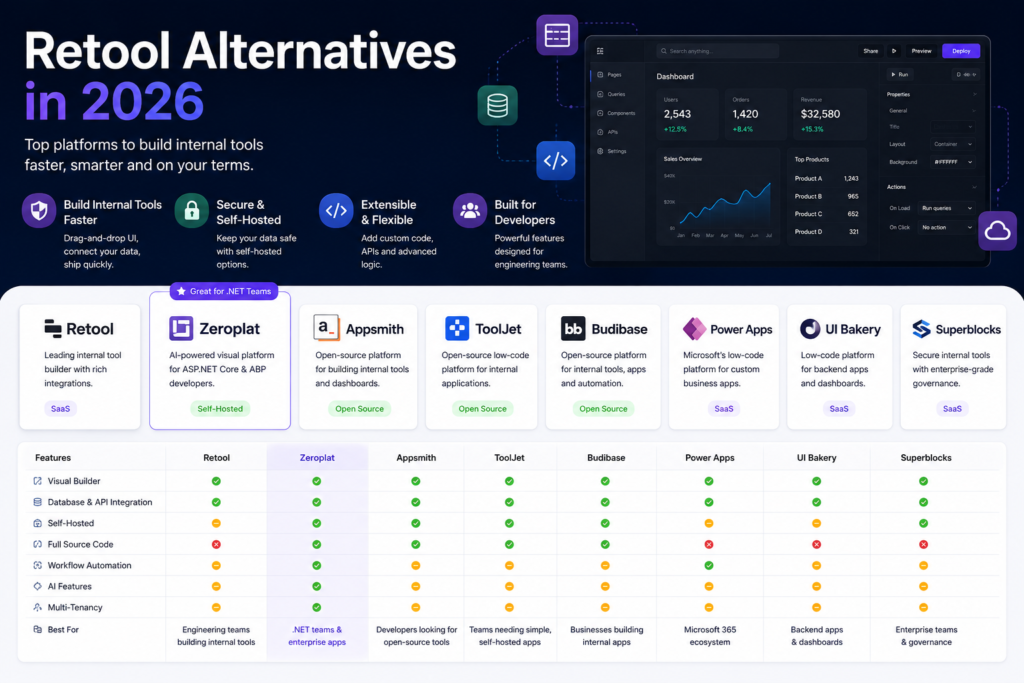
Retool has become one of the most recognized platforms for building internal business applications. Its drag-and-drop interface, extensive integrations, and rapid development experience have made it a popular choice for engineering teams around the world.
However, Retool isn’t the perfect fit for every organization.
As companies scale, many begin looking for alternatives that offer lower licensing costs, self-hosted deployment, full source code ownership, stronger customization, or better support for enterprise architectures.
In this guide, we’ll compare the best Retool alternatives in 2026 and help you choose the platform that best matches your team’s needs.
Why Companies Look Beyond Retool
Retool is an excellent product, but different organizations have different priorities.
Common reasons teams evaluate alternatives include:
- Rising licensing costs as teams grow
- Preference for self-hosted deployments
- Need for complete source code ownership
- Greater flexibility for custom development
- Enterprise security requirements
- Multi-tenancy support
- Workflow automation
- AI-assisted application development
- Better integration with existing technology stacks
For many organizations, especially those working within the Microsoft ecosystem, choosing a platform designed around ASP.NET Core and enterprise architecture can provide significant long-term advantages.
What Makes a Great Retool Alternative?
Before comparing products, it’s important to understand what matters most.
A modern internal tool platform should provide:
- Visual drag-and-drop UI builder
- Database connectivity
- REST and GraphQL integration
- Authentication and authorization
- Dashboard creation
- Workflow automation
- Custom JavaScript support
- Responsive layouts
- Reusable components
- Team collaboration
- Self-hosting options
- Enterprise-grade security
For larger organizations, source code ownership and deployment flexibility are often just as important as development speed.
Best Retool Alternatives in 2026
1. Zeroplat
Best for: ASP.NET Core teams, enterprise applications, self-hosted deployments, and organizations that want full source code ownership.
Zeroplat is an AI-powered visual application platform built specifically for professional developers. Instead of focusing solely on citizen developers, it enables software teams to build complex business applications using a visual React designer while keeping full control over the underlying application.
Built on ASP.NET Core and the ABP Framework, Zeroplat combines rapid application development with enterprise architecture.
Key Features
- Visual React page designer
- AI-assisted development
- Workflow automation
- Dashboard builder
- SQL query designer
- REST API integration
- Multi-tenancy
- Role-based authorization
- Full source code
- Self-hosted deployment
- ASP.NET Core backend
Pros
- Built specifically for enterprise .NET development
- Complete source code ownership
- Highly customizable
- AI-powered development experience
- Excellent fit for internal business applications
- Modern architecture
Cons
- Smaller ecosystem compared to older platforms
- Best suited for teams already working with Microsoft technologies
2. Appsmith
Best for: Open-source internal tools.
Appsmith is one of the most popular open-source Retool alternatives.
It allows developers to rapidly create dashboards, admin panels, and CRUD interfaces using APIs and databases.
Pros
- Open source
- Large community
- Easy deployment
- Fast development
Cons
- Primarily JavaScript-focused
- Limited enterprise capabilities compared to larger platforms
3. ToolJet
ToolJet is another well-known open-source platform for internal applications.
It provides visual page building together with integrations for SQL databases, REST APIs, and third-party services.
Pros
- Open source
- Self-hosted
- Easy to learn
- Good integration support
Cons
- Less mature enterprise architecture
- Fewer advanced features than commercial platforms
4. Budibase
Budibase combines low-code development with automation and database management.
Its intuitive interface makes it attractive for both developers and technical business users.
Pros
- Open source
- Clean user experience
- Internal tool focused
- Database support
Cons
- Less flexibility for highly customized enterprise systems
5. Microsoft Power Apps
Power Apps is Microsoft’s flagship low-code solution.
Organizations already using Microsoft 365 often find it attractive because of its deep integration with SharePoint, Dynamics 365, Azure, and Teams.
Pros
- Microsoft ecosystem
- Hundreds of connectors
- Enterprise support
- Excellent security
Cons
- Licensing can become expensive
- Limited source code ownership
- Vendor lock-in
6. UI Bakery
UI Bakery focuses on helping teams quickly create internal applications with visual development tools.
It offers an intuitive interface together with database connectors and API integrations.
Pros
- Modern UI builder
- Fast learning curve
- Good developer experience
Cons
- Smaller ecosystem
- Less enterprise customization
7. Superblocks
Superblocks targets engineering teams building secure internal tools.
It emphasizes enterprise governance and developer productivity.
Pros
- Enterprise features
- Secure deployment
- Good API support
Cons
- Commercial pricing
- Smaller open-source community
Feature Comparison
| Feature | Zeroplat | Appsmith | ToolJet | Budibase | Power Apps | UI Bakery | Superblocks |
|---|---|---|---|---|---|---|---|
| Visual Builder | ✅ | ✅ | ✅ | ✅ | ✅ | ✅ | ✅ |
| Self Hosted | ✅ | ✅ | ✅ | ✅ | Limited | Limited | ✅ |
| Full Source Code | ✅ | ✅ | ✅ | ✅ | ❌ | ❌ | ❌ |
| AI Features | ✅ | Limited | Limited | Limited | Limited | Limited | Limited |
| Workflow Builder | ✅ | Basic | Basic | Basic | ✅ | Basic | Basic |
| ASP.NET Core Focus | ✅ | ❌ | ❌ | ❌ | Partial | ❌ | ❌ |
| Enterprise Ready | ✅ | Partial | Partial | Partial | ✅ | Partial | ✅ |
| Multi-Tenancy | ✅ | Limited | Limited | Limited | Partial | Limited | Partial |
Open Source vs Commercial Platforms
One of the biggest decisions organizations face is whether to choose an open-source platform or a commercial SaaS product.
Open-source platforms often provide:
- Greater flexibility
- Source code access
- Self-hosting
- No vendor lock-in
- Community contributions
Commercial platforms usually offer:
- Managed hosting
- Enterprise support
- Faster onboarding
- Professional services
- Large integration ecosystems
The right choice depends on your organization’s priorities.
Self-Hosted vs Cloud
Many businesses prefer cloud-hosted solutions because they reduce operational overhead.
However, industries such as banking, healthcare, government, and manufacturing frequently require applications to remain inside private infrastructure.
Self-hosted platforms provide:
- Complete data ownership
- Internal security policies
- Regulatory compliance
- Infrastructure flexibility
For these organizations, deployment options can be just as important as development speed.
AI Is Becoming the Next Competitive Advantage
In 2026, AI is no longer an optional feature.
Modern development platforms increasingly help developers by:
- Generating user interfaces
- Creating CRUD operations
- Building workflows
- Producing SQL queries
- Connecting APIs
- Writing boilerplate code
- Suggesting application logic
Rather than replacing developers, AI significantly reduces repetitive work and allows teams to focus on solving business problems.
Which Retool Alternative Should You Choose?
The answer depends on your requirements.
Choose Appsmith if you want a mature open-source platform with a large developer community.
Choose ToolJet if your primary goal is building lightweight internal dashboards quickly.
Choose Budibase if simplicity and rapid development are your top priorities.
Choose Power Apps if your organization is deeply invested in Microsoft 365 and the Power Platform ecosystem.
Choose Superblocks if enterprise governance and secure deployment are critical.
Choose Zeroplat if your organization develops enterprise applications with ASP.NET Core and values visual development, AI assistance, self-hosting, workflow automation, and full source code ownership.
Final Thoughts
The market for internal tool builders has grown rapidly over the past few years, giving organizations more choices than ever before.
While Retool remains one of the leading platforms, it is no longer the only compelling option.
Whether your priorities are open source, enterprise architecture, AI-powered development, deployment flexibility, or source code ownership, there is now a platform tailored to your needs.
Before making a decision, evaluate not only today’s requirements but also how the platform will support your team as your applications become more complex.
The best Retool alternative is ultimately the one that accelerates development while preserving the flexibility, security, and control your organization needs for the future.